Optional features#
The following features can be enabled in the watch face settings, either on the smartwatch itself or via a companion mobile app. Toggle them below to preview how they look.
Azimuthal equal-area projection centered on the North Pole, rotating counterclockwise once per day.
The celestial sphere, in the same projection as the Earth map. It rotates clockwise once per year to keep the Sun at the top.
The two outermost planets. Neither was known to ancient astronomers – Uranus (magnitude ~5.7) is barely at the naked-eye limit, and Neptune (magnitude ~7.8) is invisible without a telescope.
Display time in 12-hour format with AM/PM instead of 24-hour format.
Markers showing when 3 major and 5 minor meteor showers peak. When a marker aligns with the center of the Sun with its sunspot-like overlay, that shower is at maximum activity. More on meteors.
The points where the Moon's tilted orbit crosses the ecliptic plane. Eclipses only occur when the Sun is near a node. More on the Moon.
The 12 traditional divisions of the ecliptic, each spanning 30°. The tropical zodiac begins at the vernal equinox (0° = Aries). More on the zodiac.
Large notches mark solstices and equinoxes, and small notches mark cross-quarter days, which are the midpoints between solstices and equinoxes.
Eight radial lines spaced 3 hours apart, aligned to your timezone. Their number and timezone alignment were chosen to avoid clutter.
The figure-8 path the Sun traces over a year if observed at the same time each day. More on the analemma.
Frequently asked questions#
What devices are supported?#
Spacetime requires Wear OS 4 or later. It has been tested on Pixel Watch 3, Pixel Watch 4, and Samsung Galaxy Watch 8, among others. It should work on most Wear OS 4+ devices, but compatibility can vary – if you have trouble installing, please reach out.
Is there an iOS / Apple Watch version?#
No, unfortunately Apple Watch uses a proprietary watch face format that doesn't allow third-party watch faces with this level of customization.
Can I use this as a desk clock?#
Yes, here's a fullscreen display you can use. Move the mouse to reveal a cogwheel icon in the top right. Click it to open settings where you can toggle features, change the timezone, and adjust the margins. Your settings are saved in the URL, so you can bookmark your preferred configuration.
Have any measures been taken to conserve battery life?#
The watch face is optimized to only recalculate what's necessary: the Earth map rotates every minute, Moon and Mercury update hourly, and other planets update daily (since they move slowly). It uses ambient mode (a simplified display with fewer colored pixels) when not actively viewing.
Settings don't take effect until I switch watch faces#
This is a known limitation of Watch Face Format (WFF), the framework all Wear OS watch faces are built on. When you change a setting, the new value is saved but the display may not update immediately. To apply the change, briefly switch to another watch face and then switch back. This affects all WFF-based watch faces, not just the Spacetime Watch.
Can I get a refund?#
Google Play handles all purchases and refunds. You can request a refund through the Play Store within their refund window.
Why center on the North Pole rather than the South Pole?#
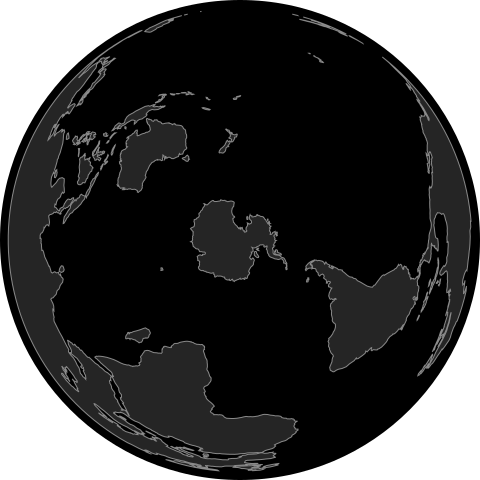
About 68% of Earth's land area is in the northern hemisphere. A south-pole-centered azimuthal projection pushes most continents to the outer edge, where the projection stretches them into thin, hard-to-recognise shapes. Here is what it would look like:
Is the Moon really on the ecliptic?#
No, the Moon's orbit is inclined 5.1° to the ecliptic. We snap all bodies onto the ecliptic ring for a cleaner display. In reality, most planets stay very close to the ecliptic – Mars, Jupiter, Neptune, and Uranus are all within 2°, and Venus and Saturn within 3.5°. Mercury is the outlier at 7.0°.
What is the exact position of the full moon on the display?#
At full moon, the Moon is directly opposite the Sun – draw a line from the Sun through the North Pole at the center, and the Moon is on the other end. To help you identify it, the Moon gets a subtle glow on the day of the full moon.
You might expect it to be on the opposite side of the ecliptic circle instead, but the azimuthal equal-area projection warps the ecliptic into an off-center ellipse, creating a misleading impression. The projection does however preserve directions from the pole, so “opposite in the sky” really means opposite across the pole – not across the ellipse.
Here is the clock at the exact moment of the full moon nearest the 2026 vernal equinox, when it looks the most wrong:
Why are Saturn's rings so thin looking?#
Saturn's rings were exactly edge-on as seen from Earth in March 2025. The ring tilt varies over Saturn's ~29.5 year orbit. The watch face calculates the current tilt angle and orientation in real-time, so you'll see the rings gradually open up over the next several years.
How accurate are the positions of the Sun, Moon and planets?#
The web version uses the astronomy-engine library for geocentric ephemeris data, verified against JPL Horizons to within 0.03°. The watch face uses compact Fourier series fitted against the web version's screen positions, achieving sub-1° accuracy for each body.
All bodies except the Sun are positioned by their ecliptic longitude projected to right ascension with ecliptic latitude forced to zero. This places every body on the ecliptic plane, ensuring that conjunctions, oppositions, and lunar phases align correctly on the display. The Sun needs no special treatment because it defines the ecliptic – its ecliptic latitude is zero by definition, so this projection is an identity operation.
The trade-off is that orbital inclination is discarded – the Moon's 5.1° inclination and Mercury's 7.0° inclination are not represented. On a one-dimensional ecliptic ring, this information cannot be shown anyway, and discarding it ensures that new moons overlap the Sun and full moons appear directly opposite, as expected.